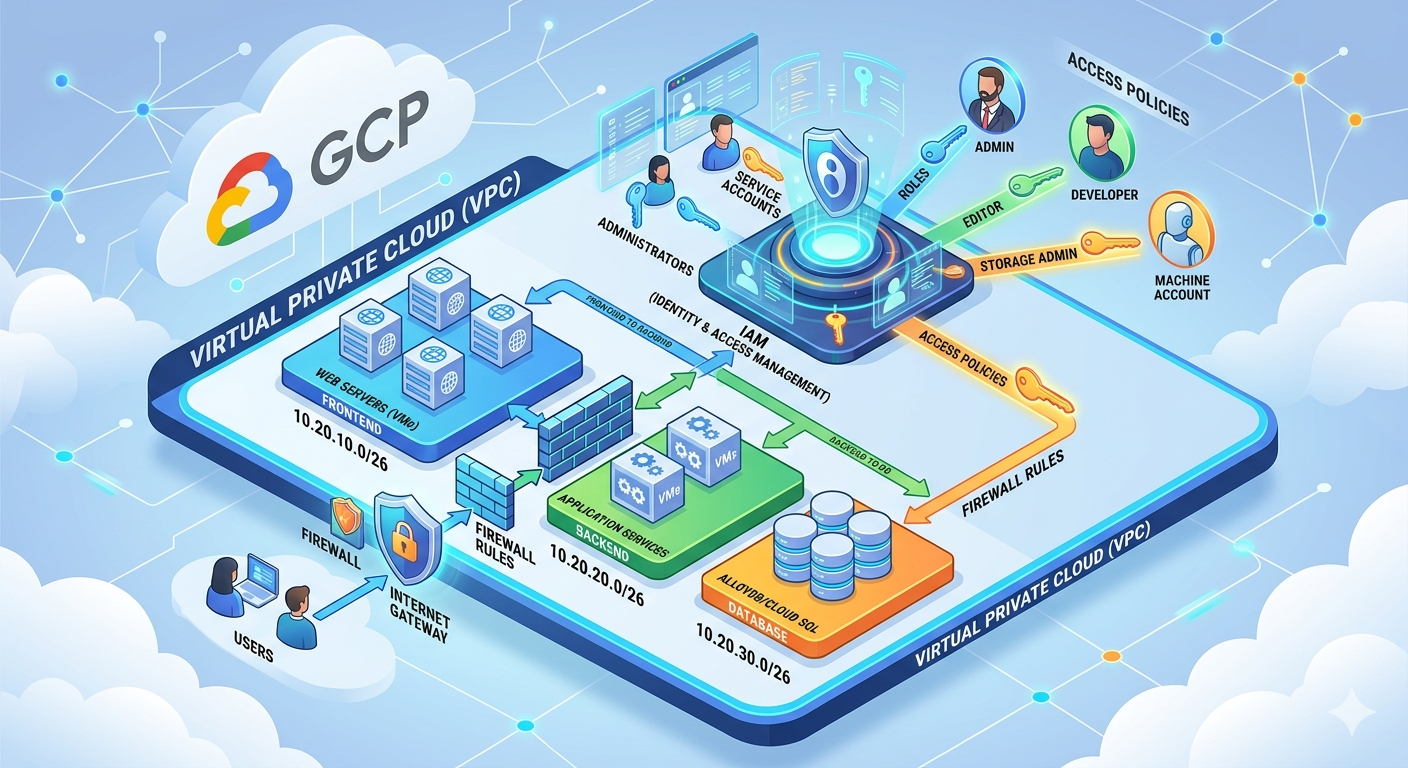
Mastering Networking and Security on GCP: VPC & IAM
Moving to the Cloud requires a solid understanding of two fundamental pillars: the network (where your resources live) and identity (who can access them). On Google Cloud Platform (GCP), this translates to the Virtual Private Cloud (VPC) and Identity and Access Management (IAM).
In this guide, we will break down these concepts to build a robust, isolated, and secure infrastructure.
1. The VPC: Your Network Foundation
What is a VPC?
A VPC (Virtual Private Cloud) is your private virtual network within GCP. It is an isolated space where you deploy your resources (VMs, Kubernetes clusters, databases).
The City Analogy: Imagine GCP is a massive metropolis like London or New York. Your VPC is a private neighborhood within this city. This neighborhood has its own streets (subnets), houses (resources), and checkpoints (firewalls). Everything happening inside the neighborhood is invisible to the rest of the city unless you decide to open a door.
Why use a VPC?
The primary goal is isolation. Without a VPC, your resources would be directly exposed to the public internet. A VPC allows you to:
- Define your own IP address ranges.
- Finely control inbound and outbound traffic.
- Securely connect your internal resources.
2. Architecture and Segmentation
For a modern application (Frontend, Backend, DB), it is crucial not to mix everything. We use subnets for this purpose.
IP Addressing Plan (CIDR)
Let's take an example of a multi-environment architecture (Staging & Production):
| Service | Environment | IP Range (CIDR) | Capacity |
|---|---|---|---|
| Frontend | Staging | 10.10.10.0/26 | 60 usable IPs |
| Frontend | Production | 10.20.10.0/26 | 60 usable IPs |
| Backend | Staging | 10.10.20.0/26 | 60 usable IPs |
| Backend | Production | 10.20.20.0/26 | 60 usable IPs |
| Database | Staging | 10.10.30.0/26 | 60 usable IPs |
| Database | Production | 10.20.30.0/26 | 60 usable IPs |
Understanding IP Calculation
The /26 mask determines the size of your subnet.
- The formula: $2^{(32 - 26)} = 2^6 = 64$ total addresses.
- Note: GCP always reserves 4 addresses (network, gateway, DNS, broadcast). This leaves 60 IPs for your machines.
Scalability
On GCP, you can expand a subnet on the fly (e.g., from /26 to /24), but you can never shrink it. Always plan for some growth.
3. Connectivity and Security
Cloud NAT: Discreet Internet Access
By default, a machine without a public IP is totally isolated. To allow it to download updates without being exposed, we use Cloud NAT. It acts as an intermediary: it allows your servers to reach the internet but prevents anyone from the outside from initiating a connection to your servers.
Firewall Rules
This is where you define who talks to whom. Example: Allowing the Frontend to communicate with the Backend.
- Source: Frontend IP range or
Network Tag(e.g.,tag-frontend). - Destination: Machines with the tag
tag-backend. - Protocol/Port: TCP 8080.
4. VPC Peering: Connecting Worlds
VPC Peering allows you to connect two different VPC networks (for example, between two GCP projects or two different organizations) so they can communicate using internal IP addresses.
Why use it?
- Performance: Traffic stays on Google's private network (low latency, high throughput).
- Security: No need to go through the public internet or a VPN.
- Cost: Less expensive than using public IPs.
Golden Rules of Peering
- No Overlapping: The IP ranges of the two VPCs must not overlap.
- Non-Transitivity: If VPC A is peered with VPC B, and VPC B is peered with VPC C, VPC A cannot talk to VPC C directly through VPC B.
- Simple Management: Once configured, routing is handled automatically by GCP.
5. IAM: Who Does What?
If the VPC is the envelope, IAM (Identity and Access Management) is the key that opens the doors.
The 3 Pillars of IAM
- The "WHO" (The Principal):
- A user (email).
- A group (e.g.,
devs@company.com). - A Service Account: An identity for a machine or a script.
- The "WHAT" (The Role): A collection of permissions.
- Predefined: Storage Admin, Compute Viewer, etc.
- Custom: Your own tailor-made roles.
- The "ON WHAT" (The Resource): The project, the bucket, or the specific instance.
Principle of Least Privilege
Never grant the Owner or Editor role by default. Always apply the principle of least privilege: give only the necessary rights, to the right person, on the right resource, and for the minimum duration.
Conclusion
Mastering VPC and IAM on GCP ensures that your infrastructure is both flexible and impenetrable. By correctly segmenting your networks and locking down access via dedicated service accounts, you build a healthy foundation for your production applications.
Need to go further? The next step is often automating these resources via Terraform!