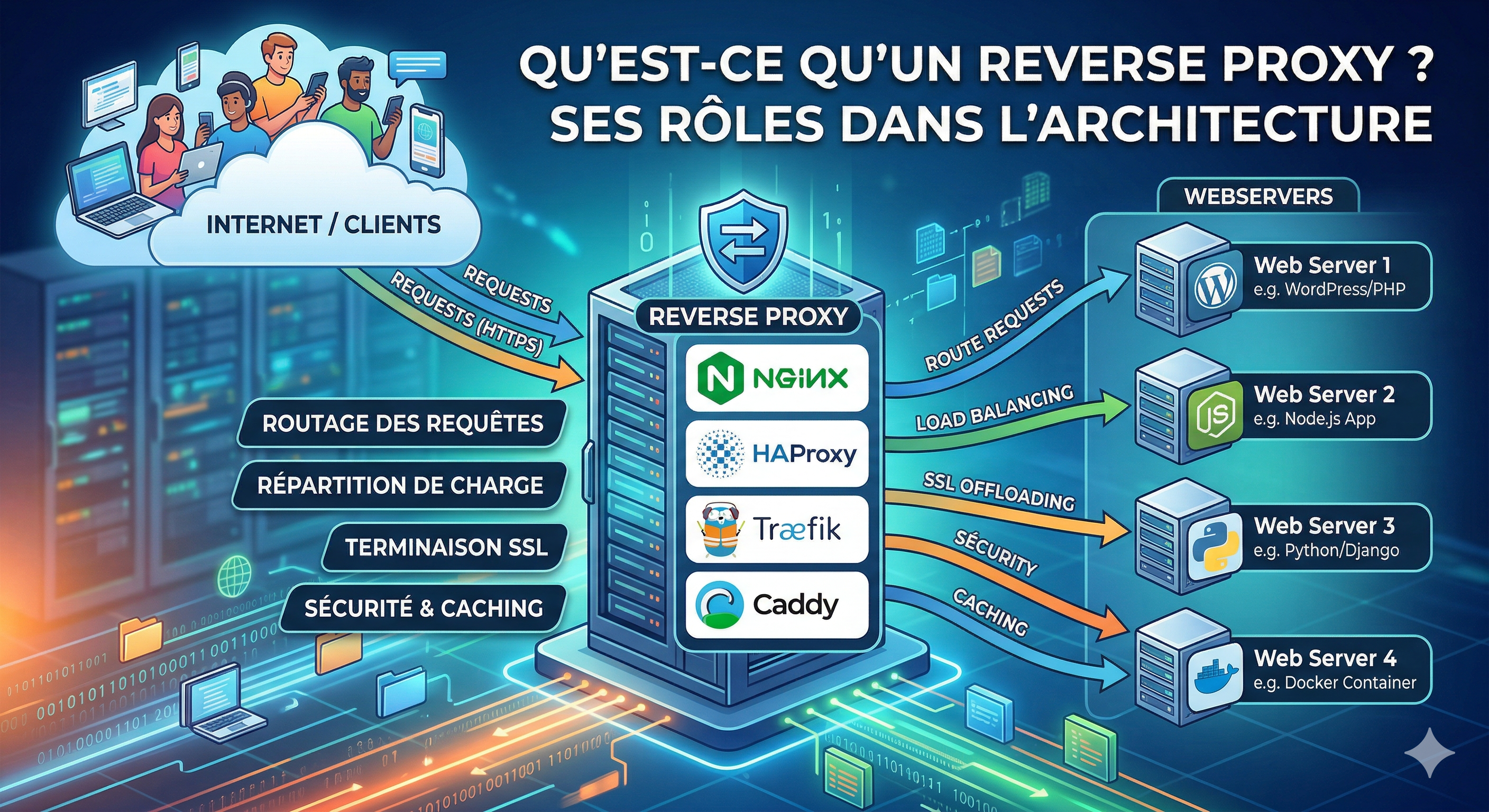
What is a Reverse Proxy and What is its Role in Your Infrastructure?
A reverse proxy is probably your best friend when it comes to improving your application's performance quickly and easily — without writing complex code or using magic tricks.
However, configuring a reverse proxy can sometimes feel tedious. Nevertheless, it remains one of the best ways to expose your applications securely and efficiently to your audience.
🛡️ Reverse Proxy — What Is It?
A reverse proxy is like Gandalf. I really like this analogy: when traffic reaches your server, the reverse proxy stands at the gate and decides who can enter and where they should go.
In general, traffic comes through HTTP or HTTPS (ports 80 and 443). The role of a reverse proxy is to inspect incoming requests (based on IP address, domain name, etc.) and route them to the correct application — as long as that application is known and configured.
Think of it as the "Google Maps" for your server. It knows where to send traffic and how to manage it. It also provides many powerful features such as:
- Caching: Storing copies of content to serve them faster.
- Security: Hiding your internal server IP and protecting against DDoS.
- SSL Termination: Handling HTTPS encryption so your app doesn't have to.
- Performance Optimization: Compressing data and managing connections.
🚦 Choosing a Reverse Proxy
Choosing the right reverse proxy is an important decision. You need to consider several factors based on your specific needs.
1. Your Architecture
Your infrastructure determines which tool fits best:
- Docker Swarm / Kubernetes: Traefik is often the best choice here. It can automatically discover your services via labels, exposing your application without manual config files.
- Classic VPS (No Docker): Nginx and Caddy are excellent choices in 2026. They are fast to install and stable.
- High-Scale Production: NGINX or HAProxy are the industry standards for heavy loads and fine-tuned control.
2. Your Traffic and Requirements
- Small Projects / Personal Tools: Caddy is a great choice. It’s simple, fast, and handles HTTPS automatically.
- Professional Grade / Fine-tuned Control: Nginx is a must-have. It requires more setup but gives you total control over every aspect of your traffic.
🛠️ Which Reverse Proxies Exist?
Let's explore the advantages and disadvantages of the most popular solutions.
Caddy
Caddy is a modern reverse proxy written in Go. Its main strengths are simplicity and speed.
- Installation: Extremely fast (often just one command).
- Configuration: Very easy — you only need a single file called the
Caddyfile. - HTTPS: It handles SSL certificates (via Let's Encrypt) automatically by default.
NGINX
Nginx is the most widely used reverse proxy in the world. It offers a perfect balance between performance and flexibility.
- Versatility: Works well for everything from small blogs to giant enterprises.
- Scalability: Scales very efficiently for high-traffic systems.
- Configuration: Uses
.conffiles (usually located in/etc/nginx/). It's more verbose than Caddy but very powerful.
Traefik
Traefik was built for the modern era of microservices and containers.
- Native Docker Support: It listens to the Docker socket and configures itself automatically.
- Dynamic: No need to restart the proxy when adding new services.
- Dashboard: Comes with a nice built-in UI to see your routes in real-time.
HAProxy
HAProxy is a true "mastodon" of performance. It is designed purely for high availability and load balancing.
- Performance: Extremely high throughput and low latency.
- Reliability: Rock-solid stability used by giants like GitHub and Stack Overflow.
- Focus: It doesn't try to be a web server; it's a dedicated proxy/load balancer.
⚖️ Load Balancing Algorithms
Load balancing is a core feature of any reverse proxy. If you have multiple instances of your app (e.g., VPS Alpha and VPS Bravo), the proxy decides how to split the work.
1. Round Robin
The simplest method. Requests are sent to each server in turn.
- How it works: VPS Alpha → VPS Bravo → VPS Alpha → VPS Bravo.
- Best for: Servers with identical capacity (80% of simple use cases).
2. Least Connections
Requests are sent to the server with the fewest active connections.
- Best for: Long-running requests (Streaming, heavy APIs).
- Advantage: Prevents overloading one server if it's processing slow requests.
3. IP Hash (Sticky Sessions)
Requests from the same client IP are always sent to the same server.
- Best for: Applications that store user sessions locally (login states, shopping carts) and don't use a shared storage like Redis.
4. Least Response Time
Sends traffic to the server that responds the fastest.
- Best for: Optimizing user experience by avoiding slower or lagging nodes.
🚀 Quick Installation & Config Guide
Here is how to set up the 4 major players with a basic example for a React/Vue (SPA) application.
1. Nginx
Ideal for serving pre-built static files with high performance.
Install:
sudo apt update && sudo apt install nginx -y
Basic Config (/etc/nginx/sites-available/myapp.conf):
server {
    listen 80;
    server_name myapp.com;

    location / {
        root /var/www/myapp/dist; # Path to your React/Vue build
        index index.html;
        try_files $uri $uri/ /index.html; # Handle SPA routing (important!)
    }
}
2. Caddy
Best for "no-fuss" SSL and easy configuration.
Install:
sudo apt install -y caddy
Basic Config (Caddyfile):
myapp.com {
    root * /var/www/myapp/dist
    file_server
    try_files {path} /index.html # SPA routing
}
3. Traefik (Docker)
The standard for containerized environments.
docker-compose.yml for your React App:
services:
  traefik:
    image: traefik:v3.0
    command: ["--api.insecure=true", "--providers.docker=true", "--entrypoints.web.address=:80"]
    ports: ["80:80", "8080:8080"]
    volumes: ["/var/run/docker.sock:/var/run/docker.sock:ro"]

  my-app:
    image: my-react-app:latest
    labels:
      - "traefik.http.routers.myapp.rule=Host(`myapp.com`)"
      - "traefik.http.services.myapp.loadbalancer.server.port=80"
4. HAProxy
Pure performance and dedicated load balancing.
Basic Frontend/Backend (/etc/haproxy/haproxy.cfg):
frontend main_gateway
    bind *:80
    acl is_myapp hdr(host) -i myapp.com
    use_backend react_cluster if is_myapp

backend react_cluster
    balance roundrobin
    server node1 192.168.1.10:80 check
    server node2 192.168.1.11:80 check
🧠 Conclusion
Choosing the right reverse proxy depends on your architecture, your traffic, and how much time you want to spend on configuration.
- Want it automatic? Go Traefik.
- Want it simple? Go Caddy.
- Want the industry standard? Go Nginx.
- Want raw performance? Go HAProxy.